Online Conversation Safety: Visualizing Protection in Digital Spaces
Navigating digital communication requires more than just strong passwords and privacy settings; it demands a cultural framework that prioritizes psychological and emotional security. Online conversation safety is the practice of establishing environments where digital interactions remain respectful, constructive, and free from targeted abuse. For community managers, HR professionals, educators, and content creators, this concept often feels abstract until it is visualized. This is where high-quality vector infographic templates become essential tools. Rather than relying on dense policy documents that few read, organizations can leverage process timeline charts and workflow layouts to make safety protocols tangible, accessible, and universally understood.
Moving Beyond Policy Documents with Visual Workflows
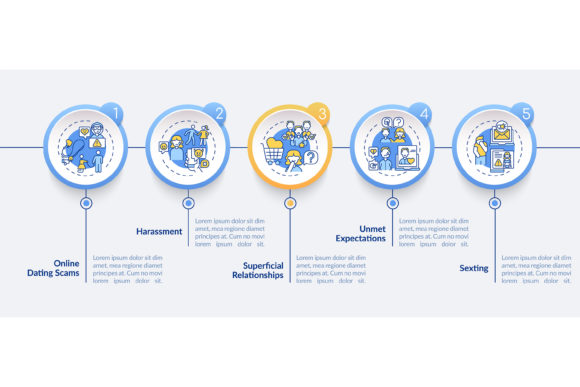
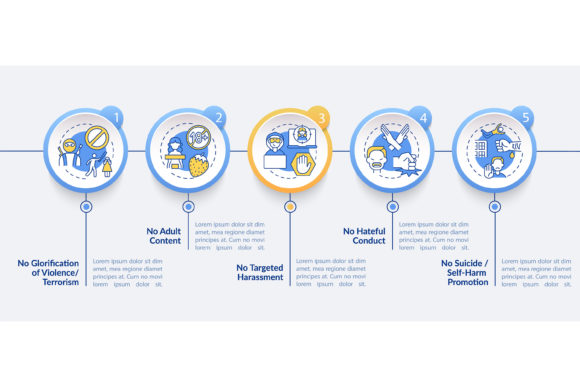
The primary challenge in maintaining safe online spaces is not a lack of rules, but a lack of clarity. When safety guidelines are buried in terms of service or lengthy handbooks, compliance drops. A linear icon workflow layout transforms these static rules into an active mental model for users. By utilizing a 5-step data visualization approach, complex moderation processes become digestible narratives. For example, instead of listing twenty prohibited behaviors, a well-designed infographic might illustrate a clear path: Identify, Assess, Report, Review, and Resolve. This sequential storytelling helps users understand not just what is forbidden, but how the ecosystem protects them when boundaries are crossed.
Visual templates serve as cognitive anchors. When a user encounters harassment or confusion, they recall the visual flowchart they saw during onboarding rather than trying to remember paragraph four of a user agreement. This is particularly vital in fast-paced environments like live streaming chats, gaming lobbies, or corporate Slack channels where decisions happen in seconds. The availability of editable file types such as AI, EPS, and SVG allows organizations to customize these anchors to match their specific branding and tone, ensuring the safety messaging feels native to the platform rather than imposed from outside.
Real-World Applications Across Industries
The utility of online conversation safety visuals extends far beyond social media moderation. Different sectors face unique friction points that require tailored visual solutions.
Corporate Remote Teams and Internal Comms
In hybrid work environments, text-based communication lacks tone and body language, making it a breeding ground for misinterpretation. HR departments are increasingly using process timeline charts to illustrate "intent vs. impact" frameworks. A vector infographic can visually demonstrate how a comment might be perceived differently than intended, providing a neutral, third-party reference point for conflict resolution. These visuals are often integrated into diversity and inclusion training or onboarding packets. Because they use clean, professional linear icons, they maintain corporate appropriateness while addressing sensitive interpersonal dynamics without triggering defensiveness.
Education and Youth Digital Citizenship
Educators teaching digital literacy need resources that resonate with younger demographics without appearing patronizing. An online conversation safety vector infographic template allows teachers to co-create safety agreements with students. By customizing the 5-step process chart, students can participate in defining what safety looks like in their specific classroom forum or Discord server. The visual nature of these templates supports neurodivergent learners who may struggle with processing large blocks of textual policy. Furthermore, having the source files in formats like PNG or JPG makes it easy to embed these reminders directly into learning management systems or digital assignment headers.
Community Management and Creator Economies
For Twitch streamers, Patreon creators, and niche forum administrators, safety is a product feature. Subscribers and members need to know that their investment includes protection from toxicity. Displaying a polished workflow layout signals professionalism and care. It shifts the narrative from reactive punishment to proactive community health. Creators often use these infographics in welcome emails or pinned posts to set expectations before conflicts arise. The ability to export in SVG ensures these graphics look crisp on any device, from mobile phones to 4K monitors, maintaining brand integrity across all touchpoints.
Designing for Clarity Without Triggering Harm
A critical consideration when selecting or creating an online conversation safety vector infographic is the aesthetic approach. Traditional anti-bullying materials often rely on aggressive imagery, red warning signs, or depictions of victims in distress. While well-intentioned, these elements can be re-traumatizing or create a defensive atmosphere. Modern best practices favor "no targeted harassment presentation design elements." This means focusing on positive reinforcement, systemic solutions, and neutral abstraction.
Effective templates utilize color psychology and spatial arrangement to convey calm and order. Blues, greens, and soft purples suggest stability and trust, whereas harsh reds should be reserved strictly for emergency stop mechanisms within the workflow. Linear icons should represent actions and systems—shields, checkmarks, speech bubbles, gears—rather than human figures in conflict. This depersonalization allows viewers to engage with the safety protocol intellectually rather than emotionally. When evaluating a template, ask whether the design empowers the viewer to take action or simply warns them of danger. The former builds resilience; the latter breeds anxiety.
Technical Versatility and Implementation Strategy
The practical value of these resources lies in their adaptability. A static image has limited utility, which is why professional templates offer multiple file formats. Understanding when to use each format maximizes the effectiveness of your safety campaign.
- AI and EPS: These are your master files. Use Adobe Illustrator or similar software to edit these when you need to change text, swap icons, or adjust colors to meet accessibility standards (WCAG). They are essential for print materials, large-format posters for office walls, or high-resolution digital displays.
- SVG: Scalable Vector Graphics are non-negotiable for web implementation. They ensure your 5-step process chart remains razor-sharp on retina screens and load instantly, improving both user experience and SEO performance. SVGs can also be animated with CSS to guide the user’s eye through the timeline.
- PNG and JPG: Best for quick sharing in newsletters, slide decks, or social media posts. PNGs support transparency, making them ideal for overlaying safety workflows onto existing branded backgrounds. JPGs are useful for email signatures or low-bandwidth contexts where file size matters.
Before deploying any visual asset, conduct a contextual audit. Does the vocabulary match your community's maturity level? Are the icons culturally appropriate for your global audience? Is the contrast sufficient for visually impaired users? A template is a starting point, not a finished product. The most successful implementations treat the vector infographic as a living document that evolves alongside community norms.
Balancing Structure with Human Nuance
While data visualization and workflow layouts provide necessary structure, they have limitations. Safety cannot be fully automated or diagrammed. There will always be edge cases that fall between the steps of a timeline chart. Users must understand that the infographic represents a framework for decision-making, not a replacement for human empathy and judgment.
Over-reliance on visual processes can sometimes lead to bureaucratic rigidity, where moderators follow the chart even when common sense suggests a different approach. To mitigate this, pair visual templates with qualitative feedback loops. Encourage users to report when the safety workflow feels inadequate or confusing. Use those insights to update the vector files regularly. The goal of online conversation safety is not perfect adherence to a graphic, but the cultivation of a shared language for respect. When used thoughtfully, these design assets bridge the gap between abstract values and daily digital behavior, creating spaces where meaningful connection can thrive without fear.